
FrameMemo vs. Otter.ai for iPhone Meeting Recording
Otter.ai is built around cloud meeting bots, shared team workspaces, and monthly minute plans. FrameMemo takes the opposite approach: on-device transcription, local summaries, whiteboard photos, and a $9.99 one-time purchase with no account and no monthly subscription.
Published by FrameMemo. Otter.ai plan details reflect Otter.ai’s published pricing and security pages and may change over time.
FrameMemo vs. Otter.ai at a glance
| Category | FrameMemo | Otter.ai |
|---|---|---|
| Pricing & minute limits | $9.99 one-time purchase on the App Store. No subscription and no monthly transcription minute cap. | Free Basic tier (300 min/month, 30 min/conversation cap); paid Pro ($16.99/mo or $8.33/mo billed annually) and Business tiers. |
| Where audio is processed | 100% on-device for recording, transcription, titles, summaries, and search. No FrameMemo account or cloud upload. | Cloud-based transcription and storage hosted on AWS servers; requires an Otter account. |
| In-person whiteboards & slides | Built-in camera capture while recording keeps whiteboard or slide photos attached to the audio and transcript. | Primarily designed around virtual meeting bots (Zoom, Google Meet, Microsoft Teams) and cloud audio sync. |
| AI Q&A and developer access | Optional BYOK Ask AI (your own OpenAI-compatible API key) plus local-network Claude Code MCP on Mac. | Built-in Otter AI Chat tied to Otter’s cloud service and plan limits. |
| Platform support | iPhone (iOS 26+), plus optional Mac pairing for Claude Code via MCP. | Web, iOS, Android, and calendar bots for Zoom, Google Meet, and Microsoft Teams. |
One-time purchase vs. monthly transcription subscriptions
FrameMemo. Pay $9.99 once on the App Store. Because transcription and summarization run on your iPhone rather than metered cloud servers, there is no monthly minute quota, no per-conversation length cap, and no recurring FrameMemo subscription. (If you choose to enable optional Ask AI, you supply your own API key and pay your chosen provider directly for API usage.)
Otter.ai. Otter’s free Basic plan includes 300 monthly transcription minutes with a 30-minute limit per conversation. Longer meetings or higher volume require upgrading to Pro or Business subscriptions. Otter.ai pricing details.
On-device privacy vs. cloud storage
FrameMemo. No sign-in is required. Your audio recordings, photos, transcripts, titles, summaries, and search index stay locally on your iPhone. Core features work offline after the initial on-device model download (about 700 MB for the local summary model). Third-party AI features—Ask AI and Claude Code MCP—are off by default and require explicit per-provider or per-computer permission, and never send original audio or photo files.
Otter.ai. Otter uploads audio to cloud servers (AWS) for transcription, cloud sync, and collaborative editing across devices, backed by SOC 2 Type II and enterprise compliance options. Otter.ai privacy and security.
Built for in-person rooms vs. virtual meeting bots
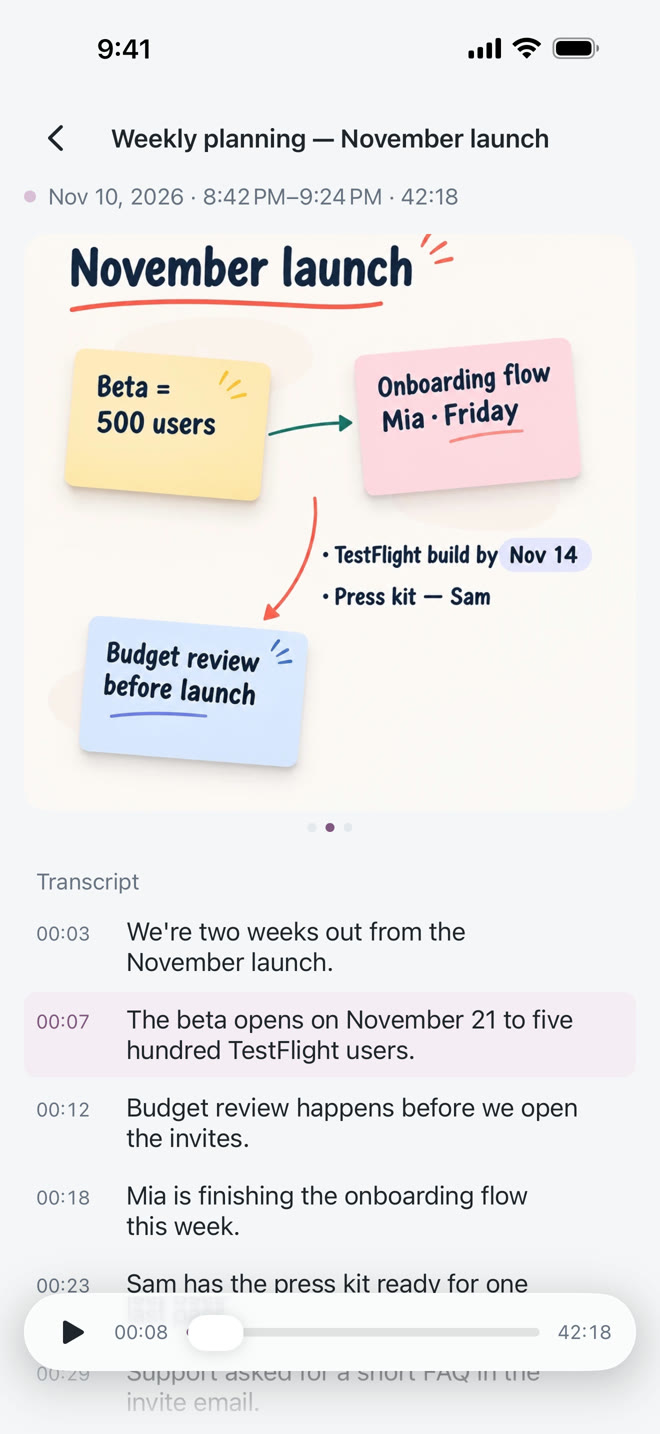
FrameMemo. Designed for real-life rooms—conference tables, whiteboards, lectures, and one-on-ones. You can snap photos of whiteboards or slides while recording without pausing audio, continue recording in the background if you lock your iPhone, and tap any transcript search result to jump straight to that timestamp.
Otter.ai. Excels when you want an automated bot (OtterNotetaker) to join Zoom, Google Meet, or Microsoft Teams calls, identify remote speakers, and share cloud notes with a team.
BYOK Ask AI and Claude Code MCP
FrameMemo. Instead of locking AI chat behind a monthly subscription, FrameMemo lets you configure any OpenAI-compatible provider (supporting streaming and tool calling) with your own API key, or pair your iPhone with Claude Code on Mac via MCP over your local network to search meeting transcripts while coding. Read the Claude Code MCP setup guide.
Otter.ai. Includes Otter AI Chat inside Otter’s web and mobile apps for querying meetings stored in your Otter cloud account.
Which app should you choose?
Choose Otter.ai if your main workflow is sending an automated bot into Zoom, Google Meet, or Microsoft Teams calls and collaborating in a shared cloud workspace across Windows, Android, and web.
Choose FrameMemo if you record in-person meetings or lectures on iPhone, want your audio and transcripts to stay on-device without a monthly subscription, need whiteboard photos saved alongside the audio, or want to query your meeting text from Claude Code on Mac.
Quick answers
Is there an offline, one-time purchase alternative to Otter.ai on iPhone?
Yes. FrameMemo is a $9.99 one-time iPhone app (iOS 26+) with no subscription and no monthly transcription minute cap. Recording, transcription, automatic titles and summaries, and search all run locally on your iPhone.
Does FrameMemo upload meeting audio to the cloud like Otter.ai?
No. FrameMemo stores audio, whiteboard photos, transcripts, and summaries locally on your iPhone without requiring an account. Optional Ask AI and Claude Code MCP are off by default and share text only after explicit permission.
Also compare FrameMemo vs. Apple Voice Memos