
How to Use Your Own API Key (BYOK) for AI Meeting Notes on iPhone
Most AI meeting recorders lock Q&A behind a $15–$30/month subscription and force your audio onto their servers. FrameMemo separates local recording from optional cloud reasoning: recording, transcription, local summaries, and search run 100% on-device, while optional Ask AI uses your own OpenAI-compatible API key directly from your iPhone.
Requirements: FrameMemo on iPhone (iOS 26+) and an API key for any OpenAI-compatible provider supporting streaming and tool calling. Ask AI is optional and off by default.
1. Configure an OpenAI-compatible provider
Open Settings in FrameMemo and enter your chosen provider’s Base URL, Model, and API Key. Because FrameMemo speaks standard OpenAI-compatible Chat Completions with streaming and tool calling, you can choose the provider and model that fits your budget and privacy policy.
Your API credentials are stored in the iOS Keychain and sent directly from your iPhone to your configured endpoint—never through FrameMemo developer-operated servers.
2. Review and authorize AI Data Sharing
Entering an API key alone does not send any recording data. Before your first Ask AI request leaves your iPhone, FrameMemo displays an explicit confirmation prompt naming your configured API hostname and model.
You can revoke sharing anytime under Settings → AI Data Sharing. Turning it off requires fresh permission before any new question or retry is sent, and never restricts core offline recording, transcription, local summaries, or search.
3. Ask across recordings with grounded citations
Instead of dumping your entire library into a prompt, FrameMemo equips your configured model with three local read-only tools:
list_recordings— Locate meetings by title or date range and read their local summaries.search_recordings— Run hybrid keyword and semantic search inside completed transcripts to retrieve relevant excerpts with audio timestamps.get_recording— Read a specific recording’s full timestamped transcript when summaries are not enough.
Answers include numbered citations (such as [1], [2]) tied directly to the retrieved recording passages so you can verify what was actually said.
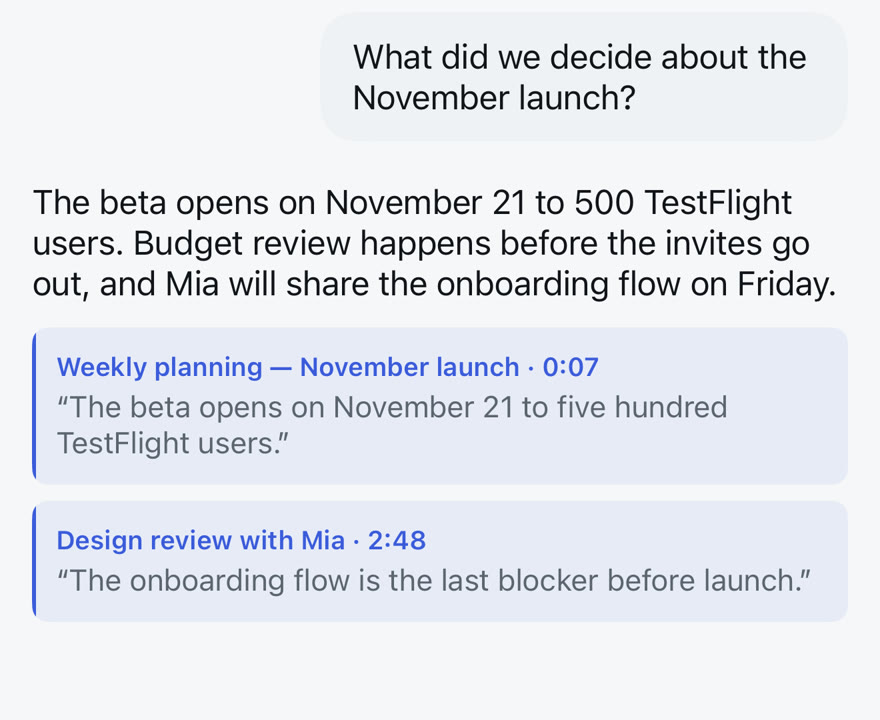
What is shared—and what never leaves your iPhone
Text only. When Ask AI runs after your permission, only your question, prior messages in that chat, and relevant recording text (titles, dates, durations, summaries, and transcript excerpts or transcripts) are sent directly to your configured provider.
Audio and photos stay local. Original audio recordings and whiteboard photos are never sent to AI providers through Ask AI.
Quick answers
Which AI providers work with FrameMemo BYOK Ask AI?
FrameMemo Ask AI works with any OpenAI-compatible Chat Completions endpoint that supports streaming and tool calling. You enter your own base URL, model name, and API key.
Does FrameMemo send my audio files or whiteboard photos when I use Ask AI?
No. Ask AI sends only your questions, conversation messages, and relevant recording text (titles, dates, durations, summaries, and transcript excerpts or transcripts) directly to your configured provider. Original audio files and whiteboard photos are never sent.
Read the full Ask AI data-sharing disclosure in our Privacy Policy
Compare FrameMemo’s one-time BYOK model vs. Otter.ai subscriptions